Chapter 5
Troubleshooting
Quick fixes for the most common button and battery mistakes.
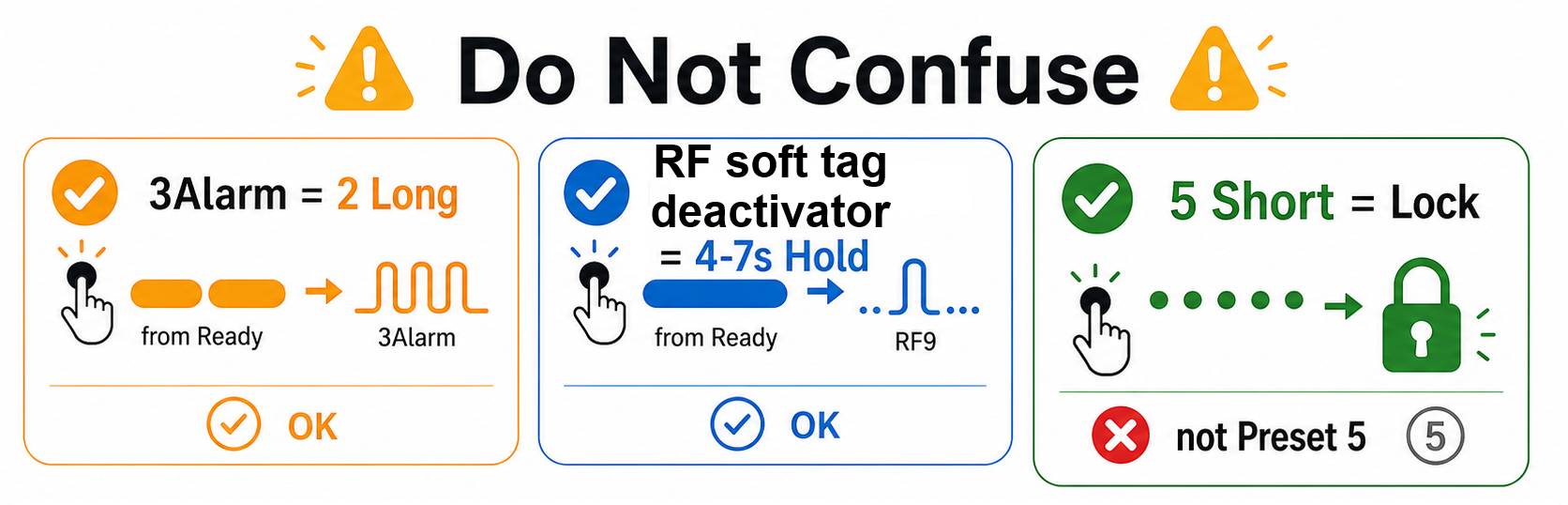
Most problems are not broken hardware. Usually the device is locked, the battery is low, or the wrong number of clicks was used.
It Does Not Start
The device may simply be Locked. Unlock first with 4 long button presses with minimal pauses, or one 7-9 second button hold, then use 2 short button taps from Ready.
Long Fade Instead Of Start
The battery is at the critical level. The device is refusing to start to protect the battery. Charge the powerbank before trying again.
One Short Tap Does Not Start
Correct. One short tap only shows the powerbank charge when the device is idle. To start, use 2 short taps from Ready.
It Locked While Tapping
If you click 5 to 8 times, the device treats it as Lock. To move between modes, first start a mode, then use 2 short taps for next or 3 short taps for previous.
Mode 1 Extra Option Did Not Change
The extra option for mode 1 can be switched only from Ready.
- Stop first with 1 long press.
- Use 4 short taps from Ready.
- Start mode 1 again with 2 short taps.
3Alarm And RF Are Different
| Wanted mode | Use this from Ready | Do not use this |
|---|---|---|
| 3Alarm | 2 long presses | 4-7 second hold |
| RF Deactivator | 4-7 second hold | 2 long presses |
Safe Recovery
If you are lost:
- Stop if active with 1 long press.
- Try 2 short taps from the current state.
- If a mode starts, stop it again with 1 long press; the device is responding normally.
- If nothing happens after the double tap, unlock the device and try again.
- If it will not unlock, fully charge the powerbank. A deeply discharged device may be too low to show even low-battery feedback.
If one short button tap shows the charge digits while the device is idle, the control electronics are alive and working.